This is a lazy post. Posts have to be lazy most of the time, or they don’t happen. I have hundreds of photographs waiting to be sorted and uploaded. But I have other things to do like fight fungus on my cherry tomato plants, cuddle kitties, earn money, and prepare for a couple of week-ends abroad.
Anyway. What I did is I picked a bunch of photos from the last month or so that I liked, and dumped them together in a set. They tell bits of my life — the parts I’ve photographed. Lots of cats and plants 🙂
I almost just embedded the slideshow here. But you’re lucky, here are the photos, with comments underneath.

I was waiting for the bus to go to my audiologist’s (who is lovely but works quite far out for somebody travelling by public transport like me) and was really disturbed by the smell of rubbish. I was grumbling about people who throw rubbish on the railway tracks or something, when I turned around and noticed the train that was parked right behind us: a garbage train. That kind of explained the smell.

When I came back from England with Quintus I was amazed at how much my tomatoes had grown. Here’s what the balcony looked like back then, early July. Not much compared to today. You can see Quintus peeking out.

I love the lake, and find it particularly beautiful when it’s stormy. I’ve been sailing a fair number of times this summer, but haven’t taken many photos. I have a facebook group for people interested in going sailing on the Farrniente. (Not my only active facebook group as you’ll soon discover.)

Corinne is in Switzerland these days, so she’s been over regularly to visit, and agreed to cat-sit for me while I was in France end July. It was love at first sight between her and Quintus. Corinne has recently redesigned my professional site. I’m very happy with the result and just need to write a little content (hah!) before it can go live. I’m quite excited to have an up-to-date professional site again, particularly as I’m now clearer about what aspects of my work I want to develop (hint: blogging/freelancers).

A couple of months ago I met Claire. I first noticed her on Twitter (@CBertol) — she was nice, a blogger and a cat person (meet @LoupiCat and his blog). She came to Bloggy Friday (yes, there’s a facebook group for that!) and I immediately noticed her nails. Turns out she’s a part-time nail artist. My brother’s wedding was coming up, and I figured it would be a good excuse to use her services.
So anyway, a few weeks later, I trekked to the other end of the canton and had my nails done. I suck at taking hand photos, I do.

I don’t think my foot photos are much better :-p

Here’s Quintus exploring the garden, with Tounsi not far behind. Did I mention they both have facebook pages? Follow the links.

There we are, here I am at my brother’s wedding. That white jacket is the most expensive item of clothing I’ve ever bought, but it was worth it. Now I need to wear it 🙂
The wedding was a really nice wedding. All weddings are nice (well, hopefully), but this one was nice in the sense that it was relaxed, sprinkled with a few nice Ukrainian traditions, there wasn’t any drama, and suddenly it was 1am and neither me nor my grandparents (who are well in their eighties!) had seen time go by.

Here are the cats again. They don’t love each other, but they tolerate each other quite well. I don’t often see them this close though, and it usually doesn’t last long, so I take a photo when it happens. Quintus started out by actively impressing Tounsi with low menacing meows when he arrived. End result: Tounsi started being afraid of Quintus — I’d actually never seen Tounsi be afraid of anything or anybody before!
Things are calming down now. Tounsi has realized that Quintus is mostly talk and not much walk, so he’s starting to stand up to him more. But Quintus is still clearly top cat.

The top cat in question, lounging on the window sill at eclau. Quintus prefers to stay in the flat, but I’m encouraging him to spend time at eclau and outside. Outside, he has his favourite spot hidden under the concrete path. It’s hollow underneath and there are two neat cat-entrances. He usually makes a beeline for it when he’s outside, and would rather be outside than hang out at eclau.
Things are changing though. He’s starting to nap at eclau and get to know the coworkers, and I’m spending a bit of time with him (and treats!) outside to encourage him to explore.
Which reminds me (I should have blogged about this already, but I haven’t, of course): we had an emergency photo shoot the other day at eclau to illustrate an article in the Financial Times I had given Ian Sanders an interview for. (That is one ugly sentence, sorry.) The photo ended up not illustrating a little feature about eclau alongside other coworking spaces, each with its little photograph, but being the main photo for the article! The link above to the article is behind a registerwall, se here’s the PDF of the article if you want to see what it looks like. Yay eclau and thanks Ian!

Back to the kitties, sharing the bed in an almost symmetrical manner.
After three kitty photos in a row, it’s no use hiding that I’m a crazy cat lady (not too old for the moment), and that there is a (francophone) facebook group for crazy cat ladies (and guys), and that I’m pretty active there posting photos of Quintus and Tounsi and liking photos of the cats responsible for the other 200 or so humans in the group.

Back to the balcony: that’s more like it! Sharing my balcony plant photos on facebook led me to create a group for people into growing stuff. Yes, another facebook group. And it’s not finished.

These sunflowers are not from my balcony, but in the garden just below. They grew to about 3 meters — I kid you not. The concierge himself was amazed — told me he’d never seen them grow that tall. I guess they liked the combination of good soil (on the compost heap) and lots of sun.

This was a yummy yummy meal I made, with green beans, which I never buy. I ended up with green beans because I signed up for a weekly basket of veggies while somebody from the coop was on holiday. And ended up with a bunch of veggies I never buy — which was exactly the point for me!
I’ve also changed the way I eat, eating a full “normal” meal at breakfast (fat + carbs, mainly), another good meal at lunch (less carbs), and a light meal in the evening (salad or the like + protein). I started doing it after being advised by a naturopath friend of mine (he’s the director of the EPSN in Lausanne). I was having trouble going to bed at night and getting up in the morning (sound familiar?). Swapping my meals around has helped a lot: I’m waking up earlier and going to bed earlier without much effort.
And when you think of it, it makes sense: you do not need huge piles of energy at night when you’re sleeping. Why eat your main meal just before going to bed? You need energy in the morning and the afternoon. Skipping breakfast or having a light breakfast doesn’t make much sense physiologically. In addition to that, it seems we have a peak of something in the morning that helps us digest fat. So, sausages and pasta in the morning, here we come!
As a perpetually hungry person, I’ve also found that I’m less hungry this way. I have a better morning because my tummy is full, I do not start starving at 10:30 am, but reach noon quite content, happy to eat again but not too hungry. And in the evening, instead of being (again) starving-waiting-for-my-main-meal, I’m barely hungry. What a change!

In addition to cherry tomatoes, I’m growing cucumbers on my balcony. This is the first one. They are absolutely delicious. They actually taste of cucumber. (Not cucumber-flavoured water. Proper cucumber.)
I have two cucumber plants. Since they started producing fruit, I’m having trouble keeping up. Good thing I love cucumber, because it’s close to one a day!

Ah, here’s one of my veggie baskets from Le jardin potager. The closest delivery point is just across the road.
This is the second one. Note the beetroots? I hate the red stuff they try and put in your salad every now and again. I thought I didn’t like beetroot. I never ever buy beetroot. I tried this dead simple recipe and discovered that I actually love beetroots. I’ll be buying more!

The round basket is Quintus’s place. He sleeps there most of the time. Tounsi snuck in at some point, and stood his ground as Quintus tried to tell him off.

This cute baby is my stepmom’s new puppy, Khaly. Isn’t she a darling?

I went to Basel last week-end to visit a friend who has been there for the last four months or so. I have a pile of photos to sort and put online of course, so here’s already one which I particularly like.

I stole this pic of a guy in the tram in front of us. I thought the cigarettes behind both ears were nearly as classy as the unlit dangling cigarette some addicts tend to have permanently glued to their mouth.

My balcony seen from outside, mid-August. It’s nice and shady on my balcony-couch.

Tounsi, at eclau. 🙂

Quintus relaxing in the garden.

My third basket of veggies. Help!

Tounsi giving me his “OMG you found me!” look.

Curled up in his new spot — I didn’t think he’d fit in there.
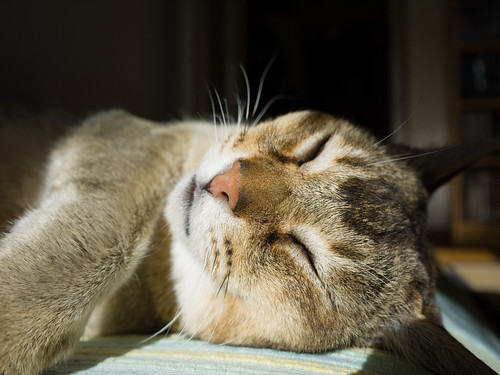
Cute nose contest.

Basking in the sunshine.

I bought some new plants yesterday for my pallet garden. It’s been through various stages since the beginning: some plants died, some were happier elsewhere, some were simply bad choices (dangly plants kill those beneath them because they cover them up). My pallet has been looking a bit drab lately, so I bought some heather and pansies and a few other plants to fill in the gaps. Fingers crossed. Watering a pallet garden is definitely a challenge — if I were starting a pallet from scratch I would build irrigation in.

I spent all afternoon yesterday removing fungus-ridden leaves from my tomatoes. I’d bunched them up way too tightly, and hadn’t pruned them enough, and the fungus loved it. Oh well, first-time tomato-grower — I’m learning. You can now see through the tomato plants.

Here’s one of the little plants. (The pot is too small, but I had extra plants, so I thought “better a small pot than kill the plant”).

Close-up of my cucumbers.

More tomatoes.

I still have an indoor jungle. I have too many plants. I think I may be a bit of a hoarder. Anybody want to adopt some of my excess plants? Let me know if you’re around Lausanne and can come and pick them up.
I’ve had a hard time putting the plants where Tounsi won’t get at them (he’s improved, but the yucca for example is irresistible for his claws) and still leave enough space for the cats to walk around on the furniture (giving them a bit of a 3D indoor space).

The tomatoes that fell off while I was pruning and reattaching the plants yesterday. Have been looking for ideas for a small quantity of green cherry tomatoes. Fried?

Quintus cuddling this morning. He likes to sleep curled up next to my ear, so I go to sleep to the music of purring kitty, which is nice. Less nice is that he makes noises when he sleeps. Voice noises. “Mmmh” each time he breathes. Some squeaky snore? A closed-mouth meow? I don’t now, but it wakes me up. So I pet him to try and get the purring started again, but as soon as I stop he drifts off again and starts squeaking.

Tounsi taking advantage of some 3D-space I set up.

One thing I finally got around to doing today is I started reorganizing my kitchen. Wow, if my memory serves me right, the kitchen cupboard space was last allocated in 2003, when I wrote “Living Space as User Interface“! I’ve added shelves and stuff since then, and cleaned out cupboards, but the kitchen is way overdue for a spring-clean and a complete re-think.
This is the cupboard above my sink, reorganized.

These are the shelves next to the sink. Not final, but at least I have somewhere for the great set of pans I brought back from Aleika’s.

Here’s a box filled with things I removed from the cupboard. Most of them have been outside the cupboard today for the first time in years. Need to sort through them, see what I get rid of, what I keep, and where I put what I keep.
Writing this last bit about the kitchen, I realize I’ve been quite good at keeping my weekends for “house stuff” (or leisure). In the Going Solo group (yup, another facebook one, remember the Going Solo conference?) we were talking the other day about setting time aside for one’s own projects. Half a day, for example.
I fear that if I do that I will quite quickly either let that half-day be taken over by work (if I’m stressed), or by “I don’t want to do anything, let me put my feet up”. I manage to not let work encroach on my week-end even when I’m “normally” stressed (I make exceptions in crisis situations of course). How can I recreate that level of “protection” for a slice of my time, but during the week? Food for thought.
Well, I hope you enjoyed the pictures and the snippets of news. Have a nice week!


