A Month From Now: Ada Lovelace Day [en]

A month from now exactly, on March 24th, it will be Ada Lovelace Day. I urge you to sign the pledge to participate and to spread the word around you so that we can reach our ambitious target of 3072 bloggers writing about a female role-model in tech or science on that day.

There are many brilliant and inspiring women in the traditionally male-dominated scientific and technical fields who often do not get as much attention or “screen time” as they might deserve. This is a real shame, all the more because women need to see female role models more than men need to see male ones, as Suw Charman-Anderson, the initiator of Ada Lovelace Day, explains very well in last year’s kick-off post. Ada Lovelace Day is a direct solution to this, by inundating the blogosphere with posts about inspiring women over the space of a day.

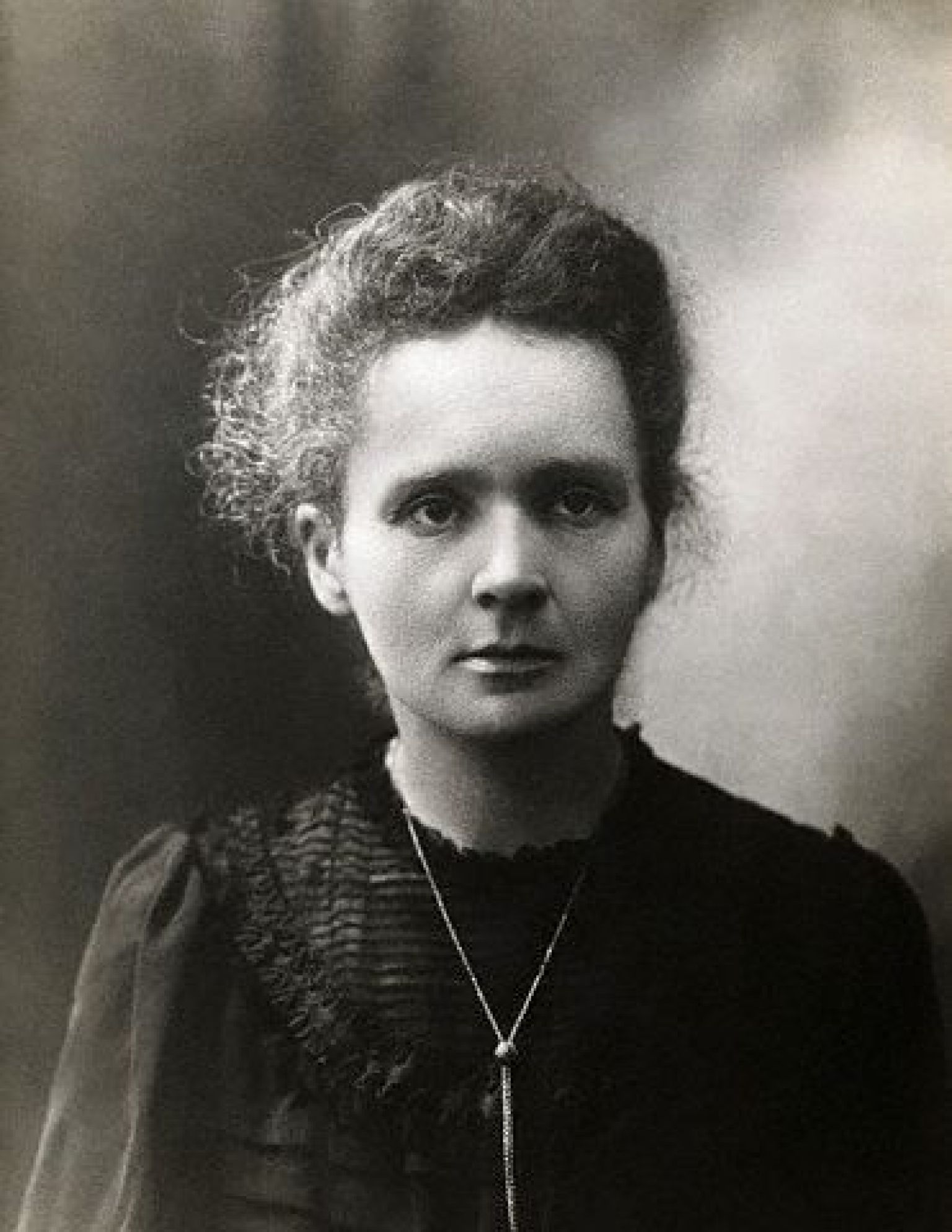
I took part last year by writing a post in French about Marie Curie. Ada Lovelace Day 2009 was a big success, with around 2000 people participating, media attention, a comic which took on a life of its own to become The Thrilling Adventures of Lovelace & Babbage and even a T-shirt, and the drive to organize Ada Lovelace Day 2010, complete with a higher target for people participating, and offline events.

We need your help to make this happen and reach our target of 3072 people participating. What can you do?

  • sign the pledge and blog about a woman in tech you admire on March 24th (please read the FAQ for more information about the why and how)
  • write about Ada Lovelace Day on your blog, and tweet about it to spread awareness
  • talk to the people around you: if you know any bloggers or influential people, ask them to participate too and spread the word
  • join the Ada Lovelace Day group on Facebook and invite your friends to join too
  • organize an offline event in your town!

I know that for many of you who think the event is a great idea and want to participate, the big question is “who should I blog about?” — particularly if you already took part last year. Here are a few thoughts to help you out:

  • you can write about any woman, be she alive or dead
  • the woman you choose to write about does not have to be famous — but she can
  • you can write about more than one woman if you like — or just about one
  • think of the women who have influenced or inspired you in some way or another throughout your life (teachers? family members? public figures? historical figures? friends? colleagues?)
  • “tech and science” is a pretty loose field, on purpose
  • if you are in the field of science or tech, look around you: are there women you know (or know of) who are not getting as much recognition as they would deserve?
  • your post doesn’t have to be about “the woman who most inspired me” or “my absolute top role-model, and she happens to be a woman” — go for “a woman who inspires me, or whom I admire”.

“Blog”, here, is shorthand for any kind of publication: video, podcast episode, web comic, newspaper column…

Thanks a lot for being part of Ada Lovelace Day!

Get Your Lift10 Ticket Half-Price Before Christmas [en]

[fr] Vous savez certainement que Lift, à Genève (5-7 mai 2010) est un des événements incontournables du milieu de la technologie en Europe. Une conférence non-commerciale, qui vous donnera matière à penser pour l'année à venir et ouvrira des portes dans votre tête dont vous ignoriez l'existence jusqu'ici. Trois jours pour 650.- (220.- par jour!) si vous vous inscrivez avant le 26 décembre. (Comparez ça aux tarifs des formations usuelles, et vous avez un prix imbattable pour du contenu inégalable.)

The reasons I gave for attending Lift nearly two years ago are still very much true. In all honesty, if there is one European tech event you should absolutely attend each year, it’s the Lift Conference in Geneva. This year, unlike the previous ones, it will take place in May (5-7th) — much nicer weather than February!

Lift10 conference in Geneva, May 5-7, 2010. In a nutshell, Lift is 3 days of extraordinary speakers you have not heard before a dozen times already, a very diverse gathering of smart and interesting attendees, various presentation formats in addition to keynotes like discussions, workshops, open stage presentations (part of the programme is community-contributed), rich hallway conversations, and a very uncommercial feel to it all.

But don’t stop there, please do read my post from two years ago, then come back. I’ve attended the conference since it started, so you might want to read some of my posts covering it (2006, 2007, 2008, 2009) — and all the videos of past talks are available freely online.

Another thing that has changed since last year besides the date is the conference pricing, which has gone up significantly for those who do not register early. Laurent wrote a really great post about the challenges encountered in pricing an event like Lift, which tries to attract attendees with different profiles and very different budgets: be too expensive, and people without an employer behind them to pay for the ticket can’t come — but be too cheap, and you’re not taken seriously (which tends to be the problem Lift has faced over the years).

Actually, anybody who provides services to a client base which is not homogeneous are faced with this dilemma, which is one of the reasons my rates (for example) vary according to which client I’m providing services to — shocking thought it may seem to some (upcoming blog post about that, by the way).

So, the good news is that if you have your ears and eyes open, and know that you’re going to Lift in 2010, you can get in for 650.- CHF (50% of the final ticket price) if you register before December 26th.

Students can apply to get one of the 20 free tickets that are reserved for them (deadline January 15th).

Journalists and bloggers should apply for a media pass.

I really hope to see you at Lift. You won’t regret it.

Interaction Space [en]

[fr] Ce qui compte, c'est qui est dans notre "espace d'interaction", autrefois délimité par l'espace physique autour de nous. Il n'y a rien de mal à attendre le bus au téléphone avec un ami plutôt qu'en échangeant des mondanités pataudes avec les inconnus qui se trouvent à l'arrêt.

At the bus stop, I’m listening to music on my iPhone and the two other women waiting are talking on the phone, smiling, but not to each other. That’s when I understand: what’s important is who is in your “can interact” space, not who is in your physical space.

Physical co-presence used to be important because it defined who you could interact with. That is not true anymore: your interaction space is not limited to your physical space.

There’s nothing bad about being on the phone with a friend rather than exchanging awkward mundanities with strangers at the bus stop.

My Web World Has Grown [en]

The day before yesterday, a tweet of mine prompted me to get into blog gear again (honestly, why do I need other people? seems I have enough inner dialog going on).

The idea, as expressed in my tweet, was half-baked. I was actually thinking back to when I started blogging, or even when I became a freelance “something-or-other” 2.0 consultant. There are more people around today. The pond is bigger. This is a normal phenomenon when it comes to adoption: if you’re an early adopter, a cutting-edger, well, sooner or later those technologies or subcultures which were the turf of a happy few you were part of become more and more mainstream.

I’m seeing that. It’s been going on for some time. There are people all over doing tons of interesting stuff and I can’t keep up with them (I don’t even try). And here, I’m not even talking about all the wannabe social media experts.

So yes, the pond has turned into a lake, and I find myself a smaller fish than I used to be. Though I sometimes look back with a bit of nostalgia upon the “golden days” of blogging or Twitter, it suits me quite well. I actually never tried to be a big fish: one day, I suddenly realised that it was how people saw me. So I went with it, quite happily I have to say.

But it’s nice to slow down. I’ve never really been in the “breaking news” business, and have no desire to. I feel I’ve retreated somewhat from the over-competitive fringe of my web world, and my life is better as a result. Business too, if I look at my calendar for the upcoming months.

There are times when I regret that my “poly-expert” profile does not allow me to stay as up-to-date with everything as I’d sometimes want to. I haven’t given a talk in a school in nearly a year, and I miss it. I’ve played with Google Wave, but haven’t taken three days to dive into it completely as I would have done five years ago. (One of the reasons, here, is that I simply can’t afford to spend three days diving into something, like I could when I was an employee. The irony is not lost on me.)

All in all, there are more people now in my web world, and in the web world in general. It’s a good thing for the world. It has changed my place somewhat, but overall I’m pretty happy with it.

I don’t feel I’ve shrunk to tadpole status yet, though! 😉

Solved Another MacBook Fan Problem! [en]

[fr] En recherchant la cause d'une trop grande activité du processeur (et donc du ventilateur) de son MacBook, ne pas oublier d'afficher "tous les processus" dans Activity Monitor. Sinon, on risque de rater MozyBackup, par exemple, qui a piqué une crise et décidé d'utiliser 99.6% du processeur...

Remember how happy I was after solving my print-queue-related MacBook fan problem? Well, for the last few days, my fan has been noisy again. I had a vague suspicion the noise coincided with when I reactivated my Mozy account and endeavoured the get my computer backed up again remotely. However, the fan remained noisy even when Mozy wasn’t uploading or being active.

A friend of mine dropped by on IM to help me troubleshoot. I went through Activity Monitor, sorted the processes by CPU, and closed off those that were using the most ressources — to no avail. The highest process on the list was using 4.5% of CPU ressources, and iStat Nano (a dashboard widget I heartily recommend) was still telling me my fan was running at around 6200rpm and my CPU temperature was approaching 70°C. I could also see that the graph depicting CPU activity was showing it pretty active overall.

I bit at loss over what to do next. Clicking around in iStat Nano, I noticed that at the top of the process list there was MozyBackup, using up 99.6% of my CPU! The reason this process didn’t appear in Activity Monitor was that I was filtering “My Processes” instead of viewing all processes, and MozyBackup was running as root.

Activity Monitor

I killed (force quit) MozyBackup, and it popped up again. I killed it again. And again. By that time, my friend had unearthed this article about Mozy Backup going crazy, where I learned that MozyBackup coming back from the dead was normal (it’s a feature).

Thankfully, once I’d killed MozyBackup a few times, it started behaving normally again, and as you can see on the screenshop posted above, it’s now happily backing up my data without squeezing all the ressources out of my poor old MacBook, which is now quiet again.

A Week After Ada Lovelace Day (ALD09) [en]

[fr] La Journée Ada Lovelace a été un grand succès, avec une participation dépassant les espérances. Je voudrais remercier tout particulièrement ceux et celles qui m'ont choisie comme sujet de leur article pour cette journée: Jean-Christophe, Michel, Graham, Stéphanie, Baud, et Delphine. On se retrouve l'année prochaine!

Oh heck, it’s been a week without a blog post on CTTS again. Maybe one day somebody will write a WordPress plugin to send reminders to over-busy bloggers like me. I had decided to write a post this morning before starting my work for the day, so here we are: a summary-roundup with a few post-event thoughts for Ada Lovelace Day.

First, it was a huge success. Nearly 2000 people signed the pledge. (Not that many have marked it as completed, but to be honest, I almost forgot myself, and a friend of mine had quite a lot of trouble figuring out how to mark her pledge as completed…) 1400 people signed up for the event on Facebook. On the day itself, #ald09 was trending nicely on Twitter (see Twitter search page screenshot). About 1000 people added their blog post to the Ada Lovelace Collection (the database needs cleaning up though, so if you are comfy with databases and have a little time to space, do let us know). Not everybody signed up everywhere, so the real numbers are somewhere in the middle.

I spent the day on Twitter, mainly (and writing my blog post about Marie Curie, in French). I was really impressed with the number of people taking part in ALD09, tweeting and blogging about it — clearly, the event had critical mass in the blogosphere. Many of the women blogged about were unknown to me, proof of how useful it is to sing our unsung heroines of tech and blog about these women who can then become role-models for more of us. I had a great time hopping from blog to blog reading about the Ada Lovelaces of today.

If you’d like to read some posts, the Ada Lovelace Day Collection is of course a great place to start. People have posted links to their posts on Twitter, on the Facebook event wall, in the pledge comments, and you can also go digging in Technorati or Google blogsearch. And if you have to check out only one of the creations for this day, go and look at Sydney Padua‘s web comic about Ada Lovelace, part 1 and part 2. I guarantee you’ll like it!

I’d like to thank Suw for having the brilliant idea behind Ada Lovelace Day, and organizing it. I’d also like to thank those of you who picked me as their “woman to blog about” on Ada Lovelace Day — I’m very honoured, humbled, happy, proud, and a little embarrassed. So, a particular thanks to Jean-Christophe, Michel, Graham, Stéphanie, Baud, Delphine, who chose me for Ada Lovelace Day, alone or alongside others. Thanks also to Henriette, Lyonel, and Luis who have included me in their posts and lists for ALD09.

See you next year!

Journée Ada Lovelace: Marie Curie [fr]

L’hiver de mes quinze ans, je me suis plongée dans des ouvrages scientifiques écrits par Isaac Asimov. De fil en aiguille, j’ai emprunté à la bibliothèque d’autres ouvrages, et fait mon éducation dans les domaines de la physique des particules, l’astrophysique, et la chimie.

J’avais jusque-là une vague ambition d’être prof de maths. Mais après ce contact avec le monde de l’infiniment petit et de l’infiniment grand, c’était décidé: je serais physicienne, chercheuse, scientifique — comme Marie Curie.

Du coup, je suis partie en section X au gymnase (ça n’existe plus, mais à l’époque, c’était une spécialité vaudoise qui combinait les programmes des sections latine et scientifique) et en chimie à l’université.

Aujourd’hui, c’est la Journée Ada Lovelace: et la femme admirable dont je veux vous parler, c’est Marie Curie. J’ai longuement hésité entre vous parler d’une figure historique ou d’une des nombreuses femmes contemporaines et plus proches de moi, et je me suis finalement décidée pour Marie Curie.

Je crois que le role qu’elle a joué en tant que modèle dans mes aspirations d’adolescente est une démonstration parfaite de l’importance d’avoir à portée de main des modèles féminins, et par conséquente de la pertinence d’une journée comme Ada Lovelace Day.

Si j’ai entrepris des études scientifiques, c’était donc parce que je me voyais chercheuse. L’image que j’avais dans la tête, c’était Pierre et Marie Curie dans leur labo — et cette femme, prix Nobel du tout début du XXe siècle… j’avoue qu’elle m’impressionnait.

En général, on mentionne “Pierre et Marie Curie”. Le couple un peu romantique de scientifiques découvrant la radioactivité, la main de Marie photographiée aux rayons X par son mari Pierre… Dans de tels cas de figure, on a vite tendance à mettre la femme un peu dans l’ombre de l’homme. Remettons l’eglise au milieu du village, si vous voulez bien.

Tout d’abord, c’est Marie qui entame ses recherches sur le rayonnement de l’uranium pour son doctorat. Un an plus tard, Pierre abandonne ses propres recherches (sur la piézoélectricité) pour la rejoindre dans ses travaux sur la radioactivité (c’est d’ailleurs elle qui a inventé ce terme). Ils obtiennent en 1904 avec Henri Becquerel le prix Nobel de physique. Elle est la première femme à recevoir un prix Nobel, et également la première femme lauréate de la Médaille Davy.

Pierre Curie meurt accidentellement en 1906. Marie vivra jusqu’en 1934 — en fait, la plus grande partie de sa carrière scientifique se fera sans son mari à ses côtés.

Elle reprend le poste de professeur à la Sorbonne de son mari décédé, devenant la première femme à enseigner dans la prestigieuse université (professeur titulaire en 1909). En 1911, deuxième prix Nobel, de chimie cette fois-ci. Elle est la première personne à recevoir deux prix Nobel pour ses travaux scientifiques, et la seule femme à ce jour.

Elle dirigera ensuite le laboratoire de physique et chimie de l’Institut du Radium (futur Institut Curie), passe son permis de conduire en 1916, et participe à la création d’unités de radiographie mobiles (les Petites Curies) pour pouvoir directement prendre des radios des soldats blessés au front, sur place. En 1925, elle crée avec sa soeur l’Institut Radium à Varsovie.

Si la vie et l’oeuvre scientifique de cette femme extraordinaire vous inspirent (j’ai mis des heures et des heures à écrire ce billet, finalement, parce que je me suis plongée dans des lectures de biographies que je n’avais pas prévues!), les articles Wikipedia en français et en anglais sont de bons points de départ (n’hésitez pas à utiliser les liens cités en source à la fin de chaque article… il y a de la lecture!)

Et vous? Qui sont les femmes scientifiques que vous admirez? Choisissez-en une, qu’elle soit célèbre ou non, et parlez-nous d’elle pour la Journée Ada Lovelace. Je me réjouis de vous lire!

Today is Ada Lovelace Day [en]

Today, March 24th, is Ada Lovelace Day — an occasion to celebrate outstanding women in technology.

I’ll be publishing my post later in the day — I look forward to reading yours!

Solved the Dreaded MacBook Fan Problem [en]

[fr] Résolu un problème qui commençait à me pourrir l'existence: le ventilateur de mon MacBook fonctionnait à fond tout le temps, même si je ne faisais rien avec mon ordinateur. Solution (voir l'article anglais pour les liens): vider les queues d'impression -- pour une raison qui me dépasse, avoir des fichiers en attente dans la queue d'impression surcharge le processeur. J'en avais qui étaient là depuis des mois!

For some time now, I’ve had a very noisy MacBook fan. As if it was on full speed all the time. I was starting to despair, and @swinhoe pointed me to the solution: delete any old print jobs which may be sitting in a printer queue.

I sent to my printer list in System Preferences. Out of the four printers installed on my machine (I never print, honest) two of them were “in use”. “In use”? I haven’t connected to a printer in months. I checked the queues, and lo and behold, there were files sitting there. I simply deleted them, and a few minutes later, my fan stopped being audible.

What a relief! This had been going on literally for months, if not longer.

So, if you find your fan is working overtime, your processor is getting hot, your battery life has melted… check your printer queues.

In Love With Evernote [en]

[fr] Evernote est un must si vous avez un iPhone. Cette application vous permet de prendre des notes dans toutes les formes (audio, texte, et image avec un bout de reconnaissance de caractères), les taguer, et les synchroniser via le serveur d'Evernote avec votre accès web ou l'application qui tourne sur votre ordinateur. Il y a également un plugin Firefox. Même si vous n'avez pas d'iPhone, je vous encourage vivement à voir en quoi Evernote peut vous être utile.

Pour ma part, voici quelques utilisations que j'en fais:

  • photos de cartes de visite, d'horaires de bus/train, d'heures d'ouverture de commerces
  • liste-photos de choses prêtées
  • notes de recherche ramassées sur le web
  • idées à creuser quand je serai en ligne
  • choses à écrire/bloguer
  • choses à acheter
  • livres lus et films vus
  • photos des choses que j'ai laissées au chalet, pour savoir si j'y ai déjà un pyjama ou non
  • ... et je cherche encore!

Et vous?

When I told you about my favourite iPhone apps, I wasn’t sure yet whether I’d like Evernote or not, as I had only just installed it.

I now know.

Evernote is your ubiquitous backup brain. It’s a place to store all the stuff you want to remember, be it snapshots (with text recognition to some extent), text, or audio notes. You can add notes and access them from the web, the desktop app (Mac <strong>and</strong> Windows, please), or your iPhone or Windows mobile phone.

If you have an iPhone and aren’t using Evernote yet, do not waste one second. Download the free Evernote iPhone app immediately, and sign up for an account. Even if you don’t have an iPhone (or a phone running Windows mobile), I really recommend you sign up, install the desktop app, and take a close look to see how it can be useful to you.

You should also install the Firefox extension or the bookmarklet if you’re using another browser.

Now that you’re done, here are some screenshots and ideas to get started using Evernote with your iPhone. First, here’s what it looks like:

Evernote

The little “Tips” tab near the bottom has a bunch of good ideas in it that made me go “oooh” and “aaaah” as I read through them. Amongst other things, I learnt to take screenshots on my iPhone:

Evernote 1

You can easily record any kind of note from your iPhone. Take a snapshot, or record some thoughts in audio format. The notes sync with the server, which will in turn sync with your desktop app — so you have everything everywhere.

Evernote 2

As you can see, notes are tagged. You can prevent the iPhone from syncing over 3G if you’re worried about bandwidth limits. I’m personally so way under mine that I turned it on.

Evernote 6

Here’s a list of what I’ve been putting in Evernote so far:

  • business cards (a bit disappointing with the MacBook iSight, haven’t tried with the iPhone camera so far — but I was a bit let down by my high hopes for textual recognition in photographs; expect it to work “a little”)
  • bus and train timetables (Lausanne and elsewhere)
  • opening hours
  • photos of things left at the chalet
  • photos of things lent to people (books, DVDs)
  • ideas for blog posts (with or without photo)
  • things I need to look up or think about
  • books I’ve read and movies I’ve seen
  • things I want to buy
  • “quotes” from books I’m reading

Other ideas:

  • recipes
  • research material
  • & (limited here only by creativity and current needs)

Bus timetable, to come back home from town without missing my last bus at night:

Evernote 4

Contents of my drawer at the chalet to help me remember that I already have a woolly pullover, a cap, a pair of pyjamas and toothpaste up there next time I go:

Evernote 5

Now, even if you tag your stuff, the pile of notes is going to build up, and you might want a little more organisation. You store notes in notebooks. Here are some of those I’ve created (with the desktop app):

Evernote 3

Notebooks can be public. For example, “Things Read and Seen” is online for everybody to see.

As notes may be a little slow to load on the iPhone (and connectivity might abandon you) you can mark some notes as favorites — they will be available offline.

With the Firefox extension, you can put snippets of web pages into notes (just highlight and click on Evernote), as well as whole pages. You can import bookmarks and notes from delicious or Google Notebook.

I’m curious. What are the other great uses of Evernote I haven’t discovered yet? The comments are yours.

Thanks to Stowe for pointing out Evernote to me way back when, even though I didn’t “get it” at the time. Thanks to Julien for recently telling me how much he liked it on his iPhone and how he was using it.